If you have ever searched “how much does YouTube pay per view,” you already know the answer is not a clean number. It changes depending on your niche, your audience, the type of ads running – and a dozen other things. But that does not mean the question is unanswerable. In this guide, we break down exactly how YouTube pay works, what real creators earn, and what you can do to push those numbers higher.
Quick Answer: Most YouTube creators earn between $1 and $5 per 1,000 views (RPM) after YouTube takes its cut. That works out to roughly $0.001–$0.005 per individual view – though high-CPM niches like finance or business can earn significantly more.
Whether you are thinking about starting a channel or already have one and want to understand your earnings better, this guide has you covered. We will also show you a faster way to build income online if the YouTube road feels too slow.
Let us start with the foundation – what is actually happening when YouTube pays you, and why “per view” is a lot more complicated than it sounds.
How YouTube pay actually works
YouTube does not pay you for every view you get. It pays you based on ad impressions – meaning someone has to actually see an ad on your video for you to earn anything. That is the first misconception most people run into.
To earn ad revenue at all, you need to be accepted into the YouTube Partner Program (YPP). As of 2026, the basic requirements are:
- At least 1,000 subscribers
- At least 4,000 valid public watch hours in the past 12 months – or 10 million valid public Shorts views in the past 90 days
- A linked AdSense account
- Compliance with all YouTube monetization policies
- Residency in a country where monetization is available
Once you are in, YouTube shares ad revenue with you – keeping roughly 45% and passing 55% to creators. That is the standard split. So when an advertiser pays $10 for 1,000 impressions, you walk away with about $5.50. The rest goes to YouTube.
Beyond ads, YouTube also pays creators a share of revenue from YouTube Premium subscribers who watch your content. There are also memberships, Super Chat, and channel merchandise – but for most creators, ad revenue is the primary income driver.
The key numbers you need to understand
To really answer “how much does YouTube pay per view,” you need to know three terms. These are the actual metrics that control your earnings. Skip them and the per-view math will never make sense.
RPM is the number to watch. A channel with a $3 RPM earning 500,000 views a month brings home roughly $1,500. A channel in a higher-CPM niche like personal finance might earn $8–$15 RPM for the same view count – meaning $4,000–$7,500 for the exact same traffic.
The gap is not about luck. It is about niche, audience, and content strategy – all things you can influence.
How much does YouTube pay per view in 2026 – real numbers
Here is what you came for. Based on publicly reported RPM data from real creators in 2026, the typical ranges look like this:
One note on these figures: They represent RPM for creators with US-heavy audiences uploading advertiser-friendly content consistently. Your actual numbers will vary based on the factors we cover in the next section.
The popular claim that “YouTube pays $0.01 per view” is a rough average across all niches and all regions. It is not wrong – but it is not a target you should anchor your expectations to. A finance creator with 100,000 monthly views could earn $1,200–$4,500. A gaming creator with the same traffic might earn $100–$400.
What controls how much YouTube pays you
Your RPM is not fixed. There are real levers you can pull to influence it. Understanding these is the difference between a channel that earns $1 per 1,000 views and one that earns $10.
1. Your niche and topic
This is the biggest factor. Finance, insurance, legal, and B2B content consistently attract higher advertiser bids because the people watching are often making expensive decisions. A single insurance lead is worth hundreds of dollars to an advertiser – so they are willing to pay more to reach that audience on YouTube.
Entertainment, gaming, and general lifestyle content attracts lower CPMs because the audience intent is less purchase-focused. This does not mean you should abandon your passion – but it does mean that a small pivot toward a higher-value sub-niche can have a noticeable impact on your RPM.
2. Where your viewers are located
Ad rates are not the same around the world. Views from the US, UK, Canada, and Australia typically generate significantly more revenue than views from many other regions. Advertisers pay more to reach audiences in high-income markets where people are more likely to buy.
If most of your traffic comes from lower-CPM regions, your overall RPM will reflect that – even if your content is excellent. Optimizing your titles, thumbnails, and even upload times to attract more viewers from higher-paying regions can make a real difference over time.
3. Video length and ad placement
Videos that hit 8 minutes or longer unlock mid-roll ads – ads that appear in the middle of the video rather than just at the start or end. More ad slots mean more opportunities for impressions, which means more revenue per video. A 12-minute video can carry three or four ad breaks. A 3-minute video might only have one.
This does not mean you should pad your videos with filler. But if you naturally have 10–12 minutes of valuable content, publishing it at full length rather than cutting it short is a straightforward way to increase earnings.
4. Viewer engagement and watch time
YouTube rewards content that holds people’s attention. The longer viewers watch, the more ads they see – and the more YouTube trusts your channel with higher-quality (and higher-paying) ad inventory. A video where people watch 80% through is treated very differently from one where they click away after 30 seconds.
Hook viewers in the first 10 seconds. Deliver value consistently throughout. Use natural stopping points to tease what is coming next. Retention and RPM are closely linked.
5. Ad types and formats enabled
YouTube offers several ad formats – skippable ads, non-skippable ads, display ads, bumper ads, and overlay ads. Enabling all relevant formats where it makes sense gives advertisers more flexibility to reach your audience, which can increase your fill rate and overall revenue.
Some creators turn off non-skippable ads out of concern for viewer experience. That is a valid choice – but it does come at an earnings cost. Testing different configurations and watching your RPM over a few weeks can help you find the right balance.
6. Advertiser-friendly content
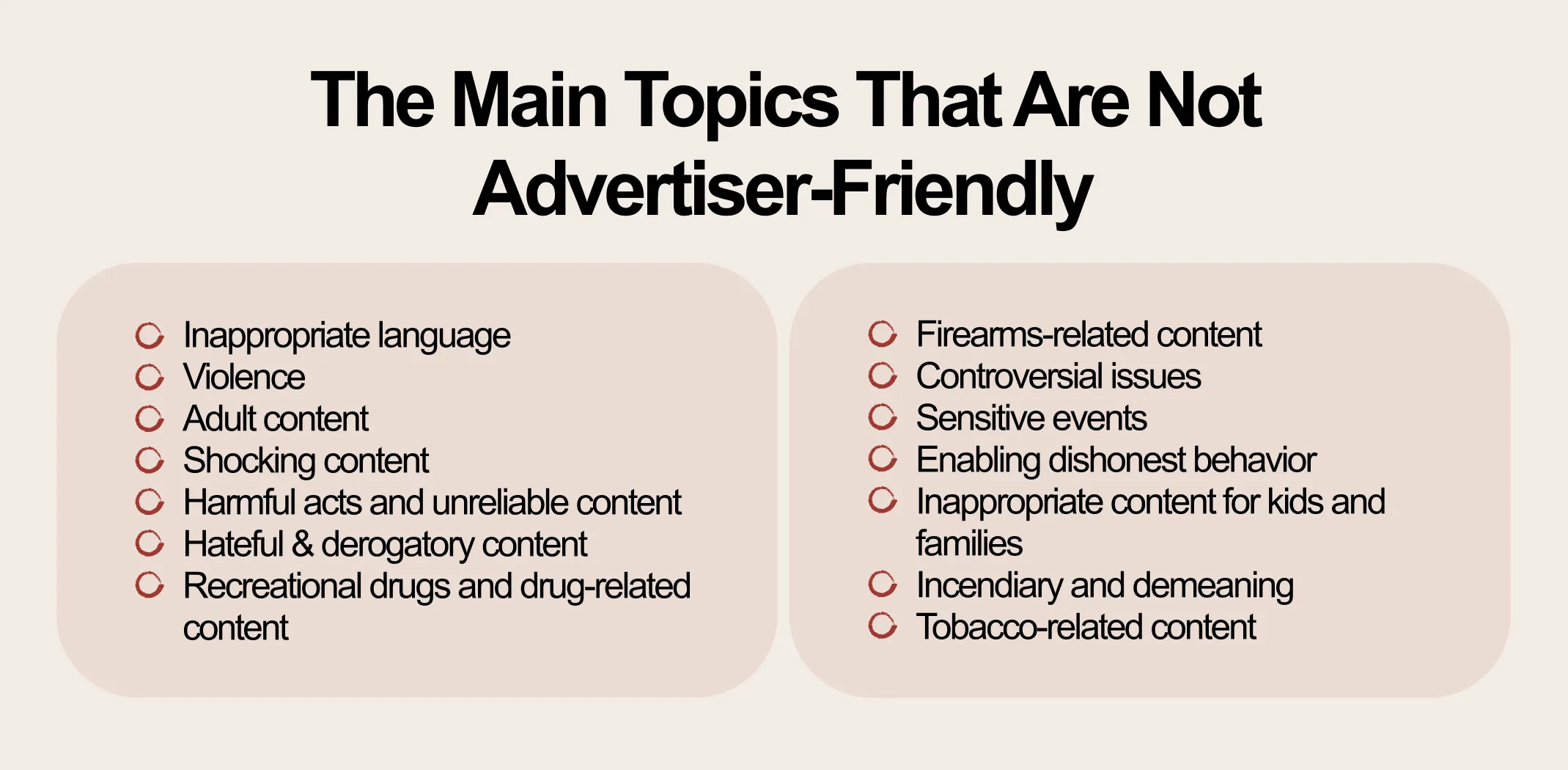
YouTube can demonetize individual videos – or entire channels – for content that falls outside advertiser guidelines. This includes extreme language, controversial political content, graphic imagery, or anything that makes advertisers uncomfortable placing their brand next to. A single demonetized video loses all its ad revenue potential, regardless of how many views it gets.
Keeping your content clean, accurate, and brand-safe is not just a creative choice – it is a financial one.
How to increase your YouTube earnings per view
Now for the practical part. These are real strategies that creators use to push their RPM higher – not vague advice, but specific actions you can take starting this week.
Move toward higher-CPM sub-niches
You do not have to overhaul your channel. But look at your existing content and ask: is there a slightly more valuable angle I could take? “Money tips for beginners” earns less than “how to invest your first $500.” “Tech unboxing” earns less than “best software tools for small business owners.” The audience is similar. The advertiser demand is very different.
Optimize for retention, not just views
A video with 50,000 views and 70% average view duration will almost always out-earn a video with 50,000 views and 20% average view duration. YouTube serves more premium ads to content that keeps people watching. Focus your energy on the first 30 seconds and the transitions between sections of your video – these are where most drop-off happens.
Publish when advertiser demand is high
Ad rates fluctuate throughout the year. Q4 – October through December – is consistently the highest-CPM period because advertisers are spending holiday budgets. January and summer months tend to be lower. Planning a content calendar around these peaks, and making sure your best videos publish in high-demand windows, can noticeably lift your average RPM.
Use analytics to find your best-performing content
Go into YouTube Studio and sort your videos by RPM. Look at the top 10. What do they have in common – topic, length, format, publishing time? Those patterns are your roadmap. Create more content that matches what is already working.
Diversify beyond ad revenue
The most successful YouTube creators do not rely on ad revenue alone. Channel memberships, affiliate links, brand sponsorships, and digital products can all significantly increase your total income per viewer. For some channels, sponsorship revenue alone exceeds ad revenue by 3x or more. Think of YouTube ads as a floor, not a ceiling.
Target a US-heavy audience
If your content has international appeal, small optimizations can shift your audience mix toward higher-paying regions. Add English captions to all videos. Use US-centric examples, references, and phrasing. Optimize your titles and descriptions for US search behavior. Over time, these shifts can lift your average RPM by moving more of your views into higher-CPM geographic segments.
The honest limits of YouTube income
This part matters. A lot of guides gloss over the harder truths about YouTube earnings – and that sets people up for disappointment.
Most new channels take 12–24 months to qualify for the YouTube Partner Program, let alone earn meaningful income. Even after qualifying, ad revenue is unpredictable. CPMs drop during slow advertising seasons. Videos get demonetized without warning. Algorithm changes can cut your views in half overnight.
The creators who earn $5,000–$20,000 a month from YouTube have typically spent 2–5 years building their channels, posting consistently, and optimizing every variable described in this article. That is not meant to discourage you – it is meant to set honest expectations.
For most people, YouTube ad revenue works best as one part of a broader income strategy – not the whole plan. Pairing a YouTube channel with another income stream, especially one that can generate revenue while you build your audience, is a much smarter approach than waiting for ad revenue to arrive.
Important note: YouTube can change its monetization policies, Partner Program requirements, or revenue share terms at any time. Always verify current requirements directly on YouTube’s support pages before making financial decisions based on projected earnings.
How to choose your path based on where you are right now
Not everyone is in the same situation. Here is a quick breakdown of what makes sense depending on your starting point.
If you are a complete beginner
Do not expect YouTube income for at least 12–18 months. Focus first on choosing a niche with decent CPM potential, learning basic video production, and publishing consistently. Treat it as a long-term project, not a quick income source. While you build your channel, consider starting a parallel income stream that can generate money now – not 18 months from now.
If you already have a small channel
Focus on the two levers that move the needle fastest: retention and niche focus. Even a small shift toward a higher-CPM sub-niche – combined with better viewer retention – can double your RPM within a few months. Start analyzing your top-performing videos and building more content in that direction.
If you want full-time income
YouTube ad revenue alone is unlikely to replace a full-time salary for most creators – at least not quickly. The creators earning $10,000+ a month from YouTube almost always have multiple revenue streams running alongside ads: sponsorships, affiliate income, digital products, or their own online business. Build YouTube as a traffic source, not just an income source. Let it feed something bigger.
Regardless of where you are starting from, the pattern is the same: the faster you can add a second income stream, the less pressure your YouTube channel has to perform immediately. That actually makes your content better – you create from a place of value rather than desperation.
Why Sellvia is a game-changer for your online store 🚀
Sellvia isn’t just another ecommerce tool. We are a trusted name in the industry, recognized by Forbes and even ranked in Inc.’s list of the 5,000 fastest-growing companies in the U.S. So if you’re serious about starting as a solopreneur, this is a smart place to begin.
Starting an online business can feel overwhelming, but that’s exactly where Sellvia steps in. It takes care of the tricky parts, so you can focus on making sales and growing your brand. Let’s break down what makes it such a great choice.
Get a ready-to-go store hassle-free 🎯
Want to start selling but don’t know where to begin? No worries! Just share your ideas, and Sellvia’s team will build a free ecommerce website that’s fully set up and ready to take orders from day one. No coding, no stress – just a store that works right out of the box.
A $100 welcome gift to grow your business faster 🎁
Starting a business takes momentum – and Sellvia gives you a head start. When you claim your free store today, you also get a $100 welcome gift to put toward growing your business. Use it to upgrade your store, boost your marketing, or unlock new tools. It is a real dollar value, handed to you on day one, with no catch and no hoops to jump through.
A massive catalog of digital products to sell 🏆
One of the biggest struggles in starting an online business is figuring out what to sell. Sellvia solves that completely. Your store comes pre-loaded with digital products – guides, courses, checklists, and tools – all created by Sellvia. You keep 50–70% of every sale. No inventory. No shipping. No logistics headaches.
Everything in one easy-to-use platform 🔥
Managing an online store shouldn’t be complicated. With Sellvia, you can handle orders, add new products, and even chat with customers – all from a simple and user-friendly platform. No need to mess with confusing tools or deal with unnecessary tech stuff. It’s all smooth sailing.
No upfront costs, just start selling 💰
A big reason people hesitate to start an online business is the cost. But here’s the good news: With Sellvia, you don’t need to invest in stock, storage, or shipping supplies. You can run your store with no upfront costs, keeping things low-risk while still making money.
Support that’s always got your back 🤝
Running a business comes with questions, but you’re never alone. Sellvia’s dedicated support team is available 24/7 to help with anything you need. Whether it’s a small question or a big challenge, they’ve got you covered.
Building a YouTube income takes time – but starting an online store with Sellvia does not. Claim your free store today and start earning while your channel grows.
How much does YouTube pay per view on average?
How much does YouTube pay for 1 million views?
At a typical RPM of 3 dollars, 1 million views would earn roughly 3,000 dollars. At a higher RPM of 10 dollars, the same 1 million views could earn 10,000 dollars. Finance and investing channels regularly see RPMs in the 12 to 45 dollar range, which means 1 million views could generate between 12,000 and 45,000 dollars for creators in those niches. The variation is significant, which is why niche selection is one of the most important decisions a YouTube creator can make.
How many views do you need to make 1000 dollars on YouTube?
It depends on your RPM. At a 5 dollar RPM, you would need 200,000 views to earn 1,000 dollars. At a 10 dollar RPM, you would need 100,000 views to reach the same amount. Most creators in standard niches need between 150,000 and 500,000 monthly views to consistently earn 1,000 dollars per month from ad revenue alone. Adding other income streams like affiliate links or digital products can reduce the view count needed to reach that milestone.
Does YouTube pay for every view or only monetized views?
YouTube does not pay for every view. Only views that result in an actual ad impression count toward your earnings. Ad blockers prevent ads from appearing on your videos, some viewers close ads before they register as an impression, and some videos are demonetized entirely, which removes ad revenue from those views. On average, only 40 to 60 percent of total views on a channel result in a monetized impression, so your effective earnings per view are lower than your CPM alone would suggest.
How long does it take to start earning money on YouTube?
To qualify for the YouTube Partner Program, most creators need 6 to 18 months of consistent uploading. Once you qualify, your first AdSense payment is issued after your balance reaches 100 dollars, which for a small channel could take several additional months. Realistically, most new creators do not earn meaningful income from YouTube for 12 to 24 months. This makes it important to treat YouTube as a long-term project and consider pairing it with a faster income stream while your channel grows.