If you have been wondering how to make money on Canva, you are in the right place. Canva is one of the most popular design tools in the world right now, and people across the United States are using it to build real income – from a few hundred dollars a month as a side hustle to a full-time creative business. The best part? You do not need to be a professional designer to get started.
Quick answer: You can make money on Canva by selling designs, offering freelance design services to clients, teaching others how to use the tool, or creating and selling ready-made templates. Most beginners earn $50–$300 in their first 30–60 days, with consistent creators reaching $1,000–$3,000 per month or more within six months.
This guide walks you through each method clearly – what it involves, how much you can realistically earn, and exactly what to do first. Whether you want a steady side income or something that could eventually replace your job, there is a path here for you.
Millions of people are already turning their creativity into online income, and Canva has lowered the barrier to entry more than any other tool in recent years. Before we get into the strategies, let us make sure we are starting from the same place.
What is Canva?
Canva is a free online design platform launched in 2013 that now has over 170 million users around the world. It lets anyone create graphics, presentations, social media posts, logos, flyers, videos, and more – using a simple drag-and-drop interface. You do not need design experience or expensive software. If you can point and click, you can use Canva.
What makes Canva so powerful for earning income is the enormous daily demand for digital content. Small businesses, bloggers, coaches, marketers, real estate agents, and teachers all need fresh, on-brand visuals every week. Most of them do not have design skills. If you can create polished graphics quickly, there is a ready-made market waiting for your work right now.
Canva offers a free version and a Pro plan at around $13 per month. The free version is enough to start earning. Pro unlocks premium features – like a brand kit, background remover, and a larger library of fonts and elements – that help you work faster and produce more polished results. You do not need it on day one, but many creators upgrade once their income from Canva justifies the cost.
Why this works in 2026: The creator economy continues to grow, with more businesses and individuals needing digital content than ever before. Canva has become the standard tool for non-designers, which means the demand for Canva-made products and services is only increasing.
How much can you realistically earn on Canva?
Earnings vary widely depending on how much time you put in, which method you choose, and how consistently you show up. Here is an honest breakdown to help you set real expectations before you start.
These are realistic monthly ranges for people who treat it as a real income source and work at it consistently. Most beginners land toward the lower end in the first 60–90 days. Those who stick with it and develop their niche regularly push into the higher ranges within six months.
One note on these income ranges: The ceiling figures assume near full-time effort, an established audience or portfolio, and a steady stream of repeat customers or clients. Most part-time creators earn $100–$600 per month combining one or two methods. That is still meaningful money – especially for someone working toward financial freedom.
The key is picking the right method for where you are right now. If you are brand new, templates and design sales are the lowest-risk starting point. If you already have some client experience or a social following, freelance services will get you to income faster. We will break down all four options in detail below.
Four ways to make money on Canva in 2026
Each of the methods below is a proven, working way to earn income using Canva. None of them are overnight solutions – they take time and consistent effort. But they are all accessible to beginners, require little to no startup cost, and can be managed from a laptop or even a smartphone.
Selling designs through the Canva Contributor program
Canva has a built-in creator program called Canva Contributor that lets you upload original design elements – illustrations, photos, icons, textures, and backgrounds – for use by other Canva users. When a Canva Pro subscriber uses one of your elements in a design, you earn a royalty payment. It is a straightforward way to start monetizing your creativity without needing to find clients or run a separate shop.
The main advantage of this method is that it is a one-and-done process per upload. You create it once, it earns repeatedly. The main limitation is that individual royalties are small, so volume matters. Creators who build a catalog of 100 or more approved elements tend to see the most consistent monthly income from this channel.
How to apply and start uploading
Visit the Canva Contributor section of the Canva website and submit an application. Once approved, you can begin uploading directly through the platform. Focus on elements with broad appeal – seasonal themes (Christmas, Valentine’s Day, summer), social media-specific formats (Instagram post frames, story backgrounds), and business-friendly graphics (icons, banners, dividers) perform consistently well. Use accurate, specific keywords in every upload so users can find your work through Canva’s internal search.
What makes a Canva design catalog succeed
Consistency beats perfection. Publishing five new elements per week will outperform spending a month perfecting one. Research what is already performing well before you create – high-demand categories include holiday themes, business branding sets, and social media content packs. Bundling related elements into cohesive series also tends to drive more visibility than isolated one-off uploads.
Earning potential: $50–$500/month with a catalog of 100 or more approved elements and regular new uploads.
Offering freelance design services to clients
Selling your design services directly to clients is the fastest way to generate meaningful income using Canva. Instead of waiting for royalty accumulation, you complete a project and get paid. Businesses of every size – from solo entrepreneurs to local shops to growing startups – need ongoing visual content and will pay someone reliable to handle it for them.
You do not need to call yourself a graphic designer or have formal training. Most small business clients need clean, on-brand social media graphics, presentation decks, marketing flyers, or email headers. Canva handles all of this beautifully. What clients are really paying for is your time, your taste, and your reliability – not your credentials.
Where to find your first design clients
Fiverr and Upwork are the two most accessible starting platforms. Create a focused service listing – something like “I will design 10 branded Instagram posts in Canva for your business” – and include three to five sample designs, even if they are mock pieces you created for practice. Beginners typically price projects between $20–$60 to build their first reviews quickly, with rates rising steadily from there. You can also approach local businesses directly. A salon, restaurant, or real estate agent with weak social media is a natural first client – offer a short free trial run to earn their trust.
How to price your design work as you grow
Start with project-based pricing rather than hourly rates. Common starting rates: logo design packages ($50–$150), social media post bundles of 10 ($30–$80), and full brand identity kits ($150–$400). Once you have five or more positive reviews on a platform, raise your prices by 20–30%. Repeat this every three to six months as your portfolio and reputation grow.
Earning potential: $500–$3,000/month working part-time to full-time with three to eight active clients.
Teaching Canva and design skills online
If you enjoy breaking things down and helping people learn, teaching Canva is a genuinely rewarding income path. There are millions of non-designers who want to improve their visuals for their businesses, blogs, or personal projects – and they actively search for someone to show them how. Canva’s popularity means the demand for Canva-focused tutorials, courses, and guides is at an all-time high.
Teaching does not have to mean filming a long, complex online course. You can start smaller and build from there. A focused YouTube channel, a downloadable Canva beginner guide sold on Gumroad, or a short course hosted on Udemy are all viable starting points that do not require a studio setup or a big audience to launch.
Platforms to host and sell your Canva courses
Udemy is the most beginner-friendly starting point for course creators because it comes with a built-in audience. The revenue share is lower (typically 37% of the sale price), but you do not need to market the course yourself to start getting students. Teachable and Kajabi let you keep a higher percentage of revenue but require you to drive your own traffic. For short guides, PDFs, or mini-courses, Gumroad charges a small fee per sale and takes minutes to set up. Many successful Canva teachers start on Udemy to build social proof, then move to their own platform once they have an audience.
What makes a Canva course actually sell
Narrow beats broad every time. “How to create a complete brand identity in Canva in 90 minutes” will outperform a general “Learn Canva” course because the outcome is specific and the promise is tangible. Lead with the transformation the student will experience, not just the tools you will cover. Bonus templates, checklists, and practice files included with your course dramatically increase perceived value – and drive more purchases and positive reviews.
Earning potential: $200–$2,000/month depending on course pricing, platform traffic, and how actively you promote your material across social media and communities.
Creating and selling Canva templates
Selling Canva templates is currently one of the most popular ways to make money on Canva, and for good reason. A template is a pre-designed, customizable Canva file that a buyer can edit with their own text, colors, and branding. Templates sell because they save people time – and busy business owners, bloggers, and content creators are absolutely willing to pay for that convenience.
Unlike the Contributor program, selling templates independently means you set your own prices and keep the majority of every sale. You sell your templates as a shareable Canva link, and buyers can customize the design using their own free Canva account. This model has turned many part-time sellers into full-time business owners.
Where to sell your Canva templates
Etsy is by far the most popular marketplace for template sellers. It has a massive built-in audience actively searching for exactly this type of product, and listing fees are just $0.20 per item. Creative Market attracts design-savvy buyers who spend more per purchase and prioritize quality. For zero platform fees, Gumroad lets you sell directly to your own audience with minimal setup. Many successful template creators list on two or three platforms simultaneously to maximize their reach. Top-selling categories include Instagram story packs, resume and CV templates, wedding stationery, business card sets, media kit templates, and digital planner pages.
How to price your Canva templates
Individual templates typically sell for $5–$25. Template bundles containing 10–20 designs are priced at $20–$60 and often convert better because the value-per-dollar is more obvious to the buyer. Start slightly below market rate while building your first reviews, then increase your prices as your shop establishes a track record. Seasonal content – holiday card sets, back-to-school planners, New Year goal-setting templates – tends to spike sharply during predictable windows, so plan your creation calendar three to four months ahead.
Earning potential: $100–$1,500/month with a well-reviewed Etsy shop and 20 or more quality template listings.
What to watch out for when earning with Canva
Before you dive in, there are a few important things to understand. Not every Canva income path is risk-free, and there are real pitfalls that can cost you your shop, your account, or your reputation if you are not careful about how you operate.
Key principle: Always review Canva’s content license before selling any design that uses Canva-supplied elements – some built-in images, icons, and fonts carry restrictions on commercial resale.
Here is what to avoid – and what to do instead:
- Do not resell unmodified Canva templates. Taking an existing Canva template as-is, relabeling it, and selling it without meaningful customization violates Canva’s terms of service. Always add significant original work to everything you sell as your own creation.
- Do not use Pro-only elements in free-tier templates. If you sell a Canva template, every element inside it needs to be accessible on the free Canva plan. Otherwise, buyers without a Pro subscription will see locked or broken content – and they will leave you a negative review for it.
- Do not copy other sellers’ work. Building your shop on designs that closely mirror existing bestsellers is both an ethical problem and a copyright risk. Develop a consistent, original visual style that stands out from what is already on the market.
- Do not ignore buyers. On Etsy and Creative Market, buyers expect responses within 24 hours. Ignoring messages damages your reviews, hurts your search ranking, and costs you repeat business.
Understanding these rules from the start protects your shop, your reputation, and your long-term income.
Which Canva income method is right for you?
The best starting point depends on your time, your comfort level with selling, and what kind of income you need right now. Here is a simple guide by reader profile.
Complete beginner
If you have never sold anything online before, start with Canva templates on Etsy. The setup is simple, the costs are minimal (just $0.20 per listing), and you can have your shop live within a weekend. Pick one niche – Instagram templates for coaches, for example, or resume designs for job seekers – and build 10–20 high-quality templates before launching. Most beginners see their first sales within 30–60 days with consistent effort. Reinvest early earnings into expanding your catalog.
Intermediate / part-time
If you have some online experience and can commit 5–10 hours per week, combine template sales with one or two freelance clients. Use Fiverr or Upwork to land client work for steady cash flow, and run your template shop on Etsy or Gumroad for scalable income on the side. This combination can realistically bring in $300–$800 per month within 90 days of consistent effort.
Advanced / full-time goal
If you want to replace your current income entirely, the path is to stack all four methods over time – freelance services for immediate cash flow, templates for scalable recurring income, and a course or teaching channel for long-term leverage. This approach takes 6–12 months of serious, consistent effort. Those who stay with it often report monthly earnings of $2,000–$5,000 or more. The key is patience in the early months and relentless focus on building a strong reputation on at least one platform before expanding.
Whatever your level, the most important step is starting. The biggest mistake most people make is spending weeks researching instead of building. Pick one method, launch something small this week, and improve as you go.
One more way to earn online – without design skills
Canva is a great tool. But it has one thing in common with every creative income method – it requires you to keep creating, keep marketing, and keep selling. The moment you stop, your income slows down. Miss a week of uploads, and your Etsy search rank drops. Lose a client, and you are back to hunting for new ones.
There is another model worth knowing about: running your own online store that sells digital products directly to customers across the United States. No design skills required. No clients to pitch. No platform algorithms working against you every time the rules change. You get a ready-built store, products already loaded in, and a built-in advertising system that can start bringing you orders on your very first day.
That is what Sellvia offers. It is not a replacement for the Canva income methods above – it is a completely separate path that removes the “constant hustle” problem and gives you something running in the background while you build everything else.
Why Sellvia is a game-changer for your online store 🚀
Sellvia isn’t just another ecommerce tool. We are a trusted name in the industry, recognized by Forbes and even ranked in Inc.’s list of the 5,000 fastest-growing companies in the U.S. So if you’re serious about starting as a solopreneur, this is a smart place to begin.
Starting an online business can feel overwhelming, but that’s exactly where Sellvia steps in. It takes care of the tricky parts, so you can focus on making sales and growing your brand. Let’s break down what makes it such a great choice.
Get a ready-to-go store hassle-free 🎯
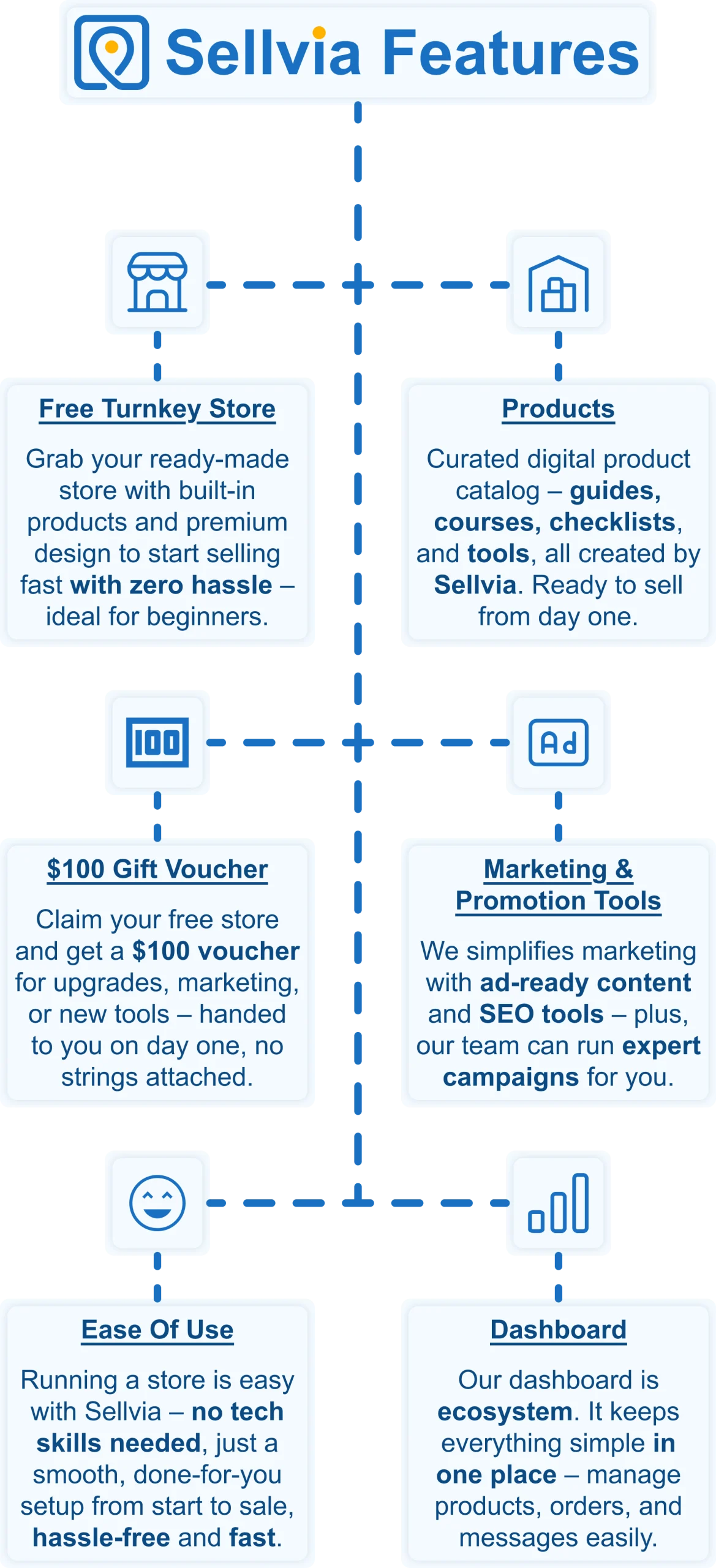
Want to start selling but don’t know where to begin? No worries! Just share your ideas, and Sellvia’s team will build a free ecommerce website that’s fully set up and ready to take orders from day one. No coding, no stress – just a store that works right out of the box.
A $100 gift voucher to grow your business faster 🎁
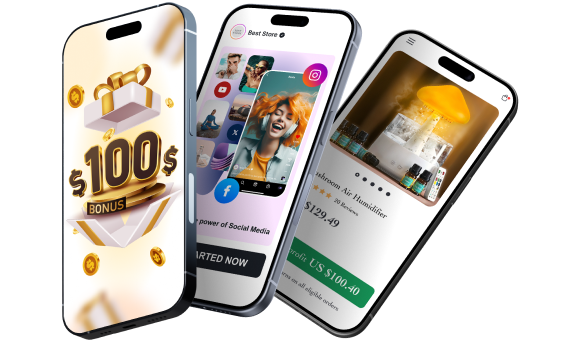
Starting a business takes momentum – and Sellvia gives you a head start. When you claim your free store today, you also get a $100 gift voucher to put toward growing your business. Use it to upgrade your store, boost your marketing, or unlock new tools. It is a real dollar value, handed to you on day one, with no catch and no hoops to jump through.
A massive catalog of digital products to sell 🏆
One of the biggest struggles in starting an online business is figuring out what to sell. Sellvia solves that completely. Your store comes pre-loaded with digital products – guides, courses, checklists, and tools – all created by Sellvia. You keep 50–70% of every sale. No inventory. No shipping. No logistics headaches.
Everything in one easy-to-use platform 🔥
Managing an online store shouldn’t be complicated. With Sellvia, you can handle orders, add new products, and even chat with customers – all from a simple and user-friendly platform. No need to mess with confusing tools or deal with unnecessary tech stuff. It’s all smooth sailing.
No upfront costs, just start selling 💰
A big reason people hesitate to start an online business is the cost. But here’s the good news: With Sellvia, you don’t need to invest in stock, storage, or shipping supplies. You can run your store with no upfront costs, keeping things low-risk while still making money.
Support that’s always got your back 🤝
Running a business comes with questions, but you’re never alone. Sellvia’s dedicated support team is available 24/7 to help with anything you need. Whether it’s a small question or a big challenge, they’ve got you covered.
If you love the idea of earning online but want a path that does not depend on design skills or chasing clients every month, Sellvia gives you everything you need to start right now. Claim your free store today and get a $100 gift voucher to put toward building your business from day one.