Over 4.6 million live stores run on Shopify. WooCommerce powers close to 40% of all stores using a known ecommerce platform. If you are thinking about starting an online business in 2026, the Shopify vs WooCommerce decision is probably one of the first choices you will face.
Quick Answer: Shopify is a fully hosted, all-in-one platform ideal for beginners who want to launch fast without touching code or managing servers. WooCommerce is a free, open-source plugin built on WordPress that gives you more control over your store, but requires more technical setup and ongoing maintenance. Neither is objectively better – the right pick depends on your goals, your budget, and how comfortable you are with technology.
This guide covers everything that matters for the Shopify vs WooCommerce decision in 2026: real pricing breakdowns, ease of use, SEO performance, platform risks, and a clear recommendation by reader profile. By the end, you will have a confident answer – and know exactly where to go from there.
Both Shopify and WooCommerce can power a profitable online business. The question is which one fits your situation right now – your timeline, your budget, and how much technical involvement you are ready for. Here is everything you need to make a confident decision.
What is Shopify vs WooCommerce?
Understanding what each platform actually is makes every decision that follows easier. Both are built for online selling – but they take fundamentally different approaches to how that works in practice.
Shopify is a cloud-based ecommerce platform launched in 2006. You pay a monthly subscription, and Shopify handles your hosting, security updates, and platform maintenance. Its ecosystem of themes, apps, and payment tools is designed to work together from day one. The goal is straightforward: abstract away the technical side of running a website so you can focus entirely on making sales.
WooCommerce is a free, open-source plugin built on WordPress – the most widely used content management system in the world, powering over 43% of all websites. When you install WooCommerce on a WordPress site, you get a complete online store: product pages, shopping cart, checkout, and payment processing. The trade-off is that you own the entire technical stack, which means you are also responsible for managing all of it.
The core distinction comes down to convenience vs control. Shopify owns the infrastructure; you pay monthly to use it. With WooCommerce, you own everything outright, but you are also on the hook for hosting, security, updates, and maintenance. In 2026, both platforms have proven themselves at scale – Shopify processes over 200 billion dollars in annual gross merchandise volume, and WooCommerce has over 5 million active installs, making it the most widely deployed ecommerce solution in the WordPress ecosystem. Whichever you choose, you are building on a mature, well-supported platform.
Understanding these fundamentals sets the stage for every decision that follows – starting with the most practical question first: what does each platform actually cost?
WooCommerce vs Shopify pricing: what does each platform actually cost?
Pricing is where most beginners get a surprise. WooCommerce looks free at first glance. Shopify looks reassuringly predictable. Neither impression tells the full story in any honest WooCommerce vs Shopify pricing comparison.
Shopify has three core plans: Basic at 29 dollars per month, Shopify at 79 dollars per month, and Advanced at 299 dollars per month – all billed annually. That is the platform fee alone. Most stores then add paid apps (5 to 50 dollars each per month), and if Shopify Payments is not available in your country, you will pay a transaction fee of 0.5% to 2% on every sale. A store doing 5,000 dollars per month in revenue could add 25 to 100 dollars in transaction fees alone, depending on the plan tier.
WooCommerce’s core plugin is free, but a production-ready store is not. You will need web hosting (5 to 30 dollars per month), a domain name (10 to 15 dollars per year), an SSL certificate (often free via Let’s Encrypt), and typically several paid extensions for advanced features. A realistic starting budget for a lean WooCommerce setup is 20 to 80 dollars per month – though that scales quickly as you add premium tools.
On a tight budget, WooCommerce often costs less – especially if you are comfortable managing WordPress yourself and using shared hosting. Shopify’s value is predictability: one monthly bill, no infrastructure decisions. The gap between the two narrows once you start adding the apps and plugins each store actually needs to function well.
One note on the pricing comparison: These figures reflect typical beginner setups. Costs scale significantly on both platforms as you add features and grow your catalog. Always map out the specific functionality your store needs before comparing plan prices in any WooCommerce vs Shopify pricing breakdown.
Annual billing reduces costs on both platforms. Shopify’s annual plans save roughly 25% compared to month-to-month. Many WordPress hosting providers offer steep first-year discounts as well. If you are confident in your platform choice, committing annually is almost always the smarter financial move – and a good habit to build into your thinking before you launch.
With the pricing picture clear, the next step is understanding how these two platforms actually feel to use day to day – and where each one pulls ahead.
Shopify vs WooCommerce: how they compare across key features
Beyond pricing, the real differences between these two platforms show up in everyday use. Here is how Shopify and WooCommerce stack up across the features that matter most for this ecommerce platform comparison in 2026.
Ease of use
This is Shopify’s clearest win. Sign up, choose a theme, add products, connect a payment method – a fully functional storefront is achievable in a few hours for most beginners. The drag-and-drop editor requires no coding, the dashboard is built for non-technical users, and Shopify’s onboarding guides you through every step. In any Shopify vs WooCommerce for beginners comparison, Shopify wins this category decisively for first-time store owners.
WooCommerce involves significantly more steps. Before you even open WooCommerce settings, you will need a hosting account, a WordPress installation, a chosen theme, and the WooCommerce plugin itself – followed by configuration, security setup, and ongoing maintenance. Beginners who have never built a website should budget at least a week before their store is ready to sell.
Why this works in 2026: Shopify has continued investing in its no-code editor and one-click integrations, making initial setup faster than ever. WooCommerce has improved too, but the underlying complexity of managing a self-hosted WordPress environment has not fundamentally changed.
Customization and design
WooCommerce wins on raw flexibility. Being open source, it allows developers to modify almost anything – checkout logic, product templates, payment flows, and third-party system integrations. Thousands of free and premium WordPress themes cover every design direction, and everything can be customized without restriction from the platform owner.
Shopify offers strong customization within defined limits. Its Online Store 2.0 editor and Liquid templating language allow significant visual and functional changes, and the Shopify App Store has over 8,000 apps for extending functionality. For most small to mid-sized stores, Shopify’s ceiling is more than sufficient. WooCommerce pulls ahead for businesses with complex or highly specific store requirements.
SEO and content marketing
WooCommerce holds a slight edge in SEO capability. WordPress is widely regarded as one of the strongest CMS platforms for SEO-focused sites, and plugins like Yoast SEO give you granular control over meta titles, descriptions, schema markup, XML sitemaps, and URL structures. Building a content-heavy blog alongside your store is seamless and unrestricted.
Shopify’s SEO has improved substantially in recent years. Editable meta fields, auto-generated sitemaps, clean URLs, and structured data are all available out of the box. Some legacy constraints remain – including the mandatory /products/ and /collections/ URL prefixes – but these rarely affect rankings in practice. For most stores, the SEO gap between the two platforms is minor in this ecommerce platform comparison. It becomes meaningful only at significant scale or in highly competitive niches where every technical detail matters.
Customer support and platform reliability
Shopify offers 24/7 live chat, email, and phone support on higher plans. As a managed platform, it also handles server uptime, security patches, and emergency fixes on your behalf. Your store stays online without you needing to think about infrastructure – a genuine daily advantage for anyone who does not want to manage a server.
WooCommerce relies on community support. WordPress forums, plugin documentation, hosting provider help desks, and freelance developers form the support layer – there is no centralized team you can call when something breaks. Premium managed WordPress hosts like Kinsta and WP Engine offer dedicated support at additional cost, but that adds to your monthly overhead. For experienced developers this trade-off is manageable – for beginners, Shopify’s centralized support removes a meaningful layer of operational risk.
That covers the main decision points in any honest Shopify vs WooCommerce evaluation. Before you choose, there is one more area worth understanding: the specific risks on each platform.
What to watch out for on both platforms
Understanding the risks on each platform is just as important as understanding the features. Both Shopify and WooCommerce have specific vulnerabilities worth knowing before you commit – and this is an area most ecommerce platform comparison articles skip over.
With Shopify, the primary risk is platform dependency. Shopify can suspend accounts for terms of service violations, sometimes with limited notice. Sellers in grey-area product categories have documented account restrictions in communities like Reddit and across Trustpilot reviews. Shopify also controls your store’s entire infrastructure, which means pricing changes, policy updates, and platform decisions are entirely outside your control. Running a Shopify store means renting, not owning, your commercial foundation.
With WooCommerce, the risks are operational. Failing to update WordPress core or plugins is the leading cause of site compromises – malware injections are a common consequence of neglected maintenance. A poorly configured hosting environment can produce slow load speeds that directly hurt your conversion rates. These risks are entirely manageable with good habits, but they require consistent attention that Shopify users simply do not have to give.
Key principle: Whichever platform you choose, always maintain regular backups, use strong passwords with two-factor authentication, and review the acceptable use policy carefully before listing any products.
The Shopify vs WooCommerce decision ultimately comes down to your priorities: speed and simplicity vs control and cost efficiency. Both platforms have helped millions of entrepreneurs build successful online businesses in 2026. Getting your foundation right is what the next section is all about.
Which platform should you choose? A guide by reader profile
The right platform is different for every person. Here is a direct guide based on your actual situation and goals – arguably the most useful part of any Shopify vs WooCommerce for beginners comparison.
Complete beginner with no technical background
Choose Shopify. Setup is fast, the interface is intuitive, and you will not need to manage hosting, security, or software updates. The monthly cost is higher than WooCommerce’s floor, but you are paying for speed and simplicity – both genuinely valuable when you are still learning how online selling works. In Shopify vs WooCommerce for beginners comparisons, Shopify is consistently the clearer starting point for people who have never built a website before.
Budget-conscious entrepreneur willing to learn
WooCommerce is worth the setup effort if you are prepared to spend a few days getting it right and handle ongoing maintenance going forward. The long-term cost is lower, the SEO ceiling is higher, and you own your data and infrastructure outright. Pair it with a reliable managed WordPress host – SiteGround, Cloudways, or WP Engine for a more premium option – and your foundation will be solid.
Developer or technical user
WooCommerce is almost certainly the better fit. The open-source codebase, flexible plugin architecture, and full database access give you the kind of control that Shopify’s closed system does not offer. If you are building stores for clients or running a complex multi-category operation, WooCommerce’s flexibility is a genuine advantage that stands out in any serious ecommerce platform comparison.
Exploring Shopify alternatives
If neither platform feels like the right fit, a few Shopify alternatives are worth considering. BigCommerce offers a similar hosted model with no transaction fees and more flexibility on lower-tier plans. Squarespace Commerce suits small brand-forward stores with a limited product catalog. Wix eCommerce has matured significantly and handles simple operations well. That said, for serious online selling at any meaningful scale, Shopify and WooCommerce remain the two most capable and widely supported platforms in 2026 by a wide margin.
The best ecommerce platform in 2026 is ultimately the one you actually launch and operate consistently. Both Shopify and WooCommerce have powered businesses from zero to six and seven figures – the platform is the vehicle, not the destination. But there is a third option worth knowing about before you commit to building from scratch on either one.
The third option most comparison articles skip
Here is something worth knowing before you commit hours to setting up either platform. Both Shopify and WooCommerce require you to build your store from scratch – choosing a theme, writing product descriptions, configuring payments, and learning the platform mechanics before you have made a single sale. That is weeks of work before you see your first dollar.
There is a third path: a fully built, ready-to-launch online store that arrives pre-loaded with digital products, a professional design, and everything configured to start making sales from day one. That is exactly what Sellvia offers – and it is worth understanding before you commit to building from scratch on either platform.
Think about what that actually means in practice. On Shopify, you spend days choosing a theme, writing product copy, setting up payment gateways, and troubleshooting the checkout. On WooCommerce, add hosting research, WordPress setup, and plugin configuration on top of all of that. With Sellvia, you share your ideas, a team builds your store, loads it with digital products – guides, courses, checklists, and tools – and hands it back to you ready to sell. The built-in advertising system means you can turn on ads the same day and start receiving orders, with a 40-dollar ad coupon included in your 14-day free trial.
Sellvia is featured by Forbes and ranked in Inc.’s list of the 5,000 fastest-growing companies in the U.S. – with over 1,500,000 stores launched and more than 1.5 billion dollars earned by store owners. The Shopify vs WooCommerce comparison is a real and useful one. But it assumes you want to build everything yourself. If you are looking for the fastest, simplest path to a working online business in 2026, there is an option that skips the technical setup entirely.
Why Sellvia is a game-changer for your online store 🚀
Sellvia isn’t just another ecommerce tool. We are a trusted name in the industry, recognized by Forbes and even ranked in Inc.’s list of the 5,000 fastest-growing companies in the U.S. So if you’re serious about starting as a solopreneur, this is a smart place to begin.
Starting an online business can feel overwhelming, but that’s exactly where Sellvia steps in. It takes care of the tricky parts, so you can focus on making sales and growing your brand. Let’s break down what makes it such a great choice.
Get a ready-to-go store hassle-free 🎯
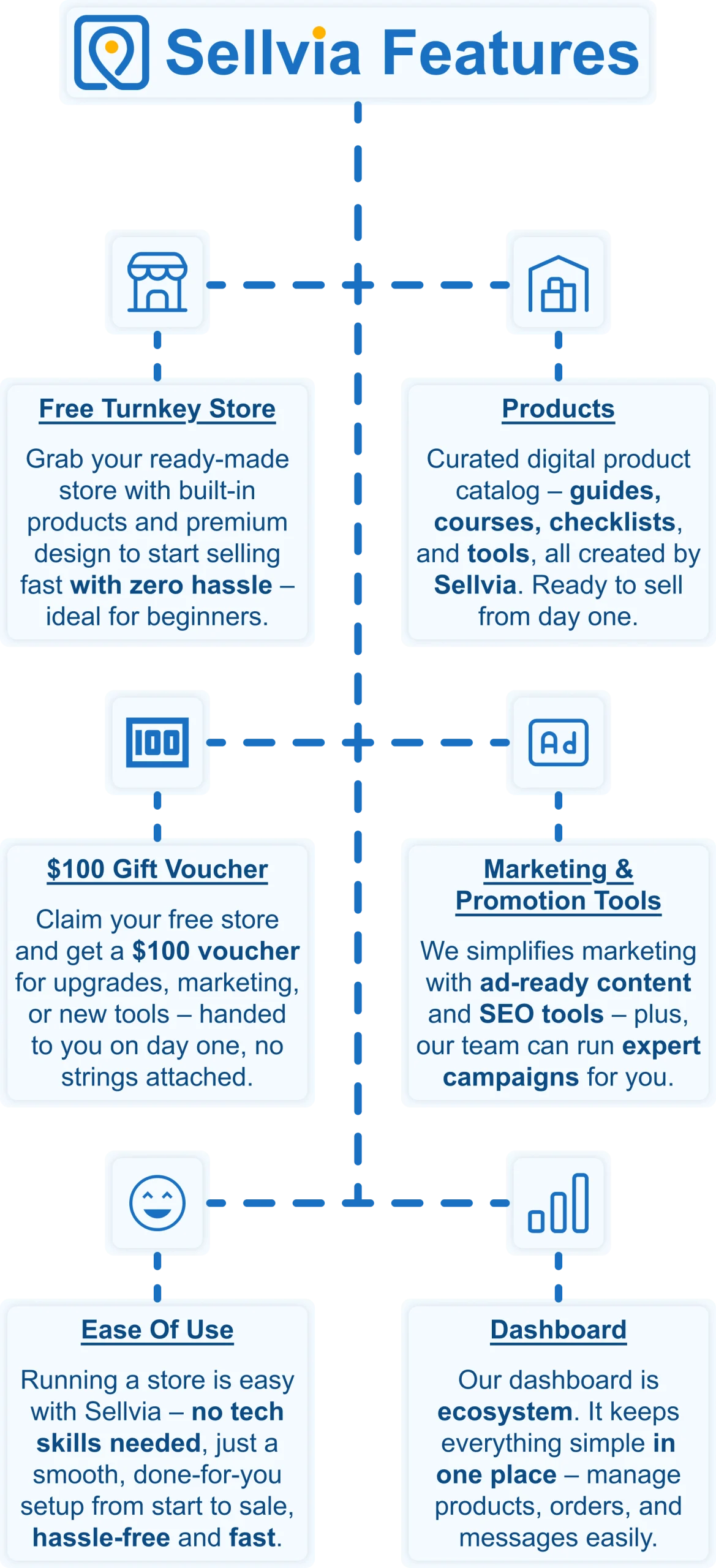
Want to start selling but don’t know where to begin? No worries! Just share your ideas, and Sellvia’s team will build a free ecommerce website that’s fully set up and ready to take orders from day one. No coding, no stress – just a store that works right out of the box.
A $100 gift voucher to grow your business faster 🎁
Starting a business takes momentum – and Sellvia gives you a head start. When you claim your free store today, you also get a $100 gift voucher to put toward growing your business. Use it to upgrade your store, boost your marketing, or unlock new tools. It is a real dollar value, handed to you on day one, with no catch and no hoops to jump through.
A massive catalog of digital products to sell 🏆
One of the biggest struggles in starting an online business is figuring out what to sell. Sellvia solves that completely. Your store comes pre-loaded with digital products – guides, courses, checklists, and tools – all created by Sellvia. You keep 50–70% of every sale. No inventory. No shipping. No logistics headaches.
Everything in one easy-to-use platform 🔥
Managing an online store shouldn’t be complicated. With Sellvia, you can handle orders, add new products, and even chat with customers – all from a simple and user-friendly platform. No need to mess with confusing tools or deal with unnecessary tech stuff. It’s all smooth sailing.
No upfront costs, just start selling 💰
A big reason people hesitate to start an online business is the cost. But here’s the good news: With Sellvia, you don’t need to invest in stock, storage, or shipping supplies. You can run your store with no upfront costs, keeping things low-risk while still making money.
Support that’s always got your back 🤝
Running a business comes with questions, but you’re never alone. Sellvia’s dedicated support team is available 24/7 to help with anything you need. Whether it’s a small question or a big challenge, they’ve got you covered.
While Shopify and WooCommerce both require weeks of technical setup before your first sale, Sellvia hands you a ready-made online store with digital products and built-in advertising – so you can skip the setup and focus on earning. Claim your free Sellvia store today and start making sales without the weeks of platform setup either option requires.